The store will not work correctly in the case when cookies are disabled.

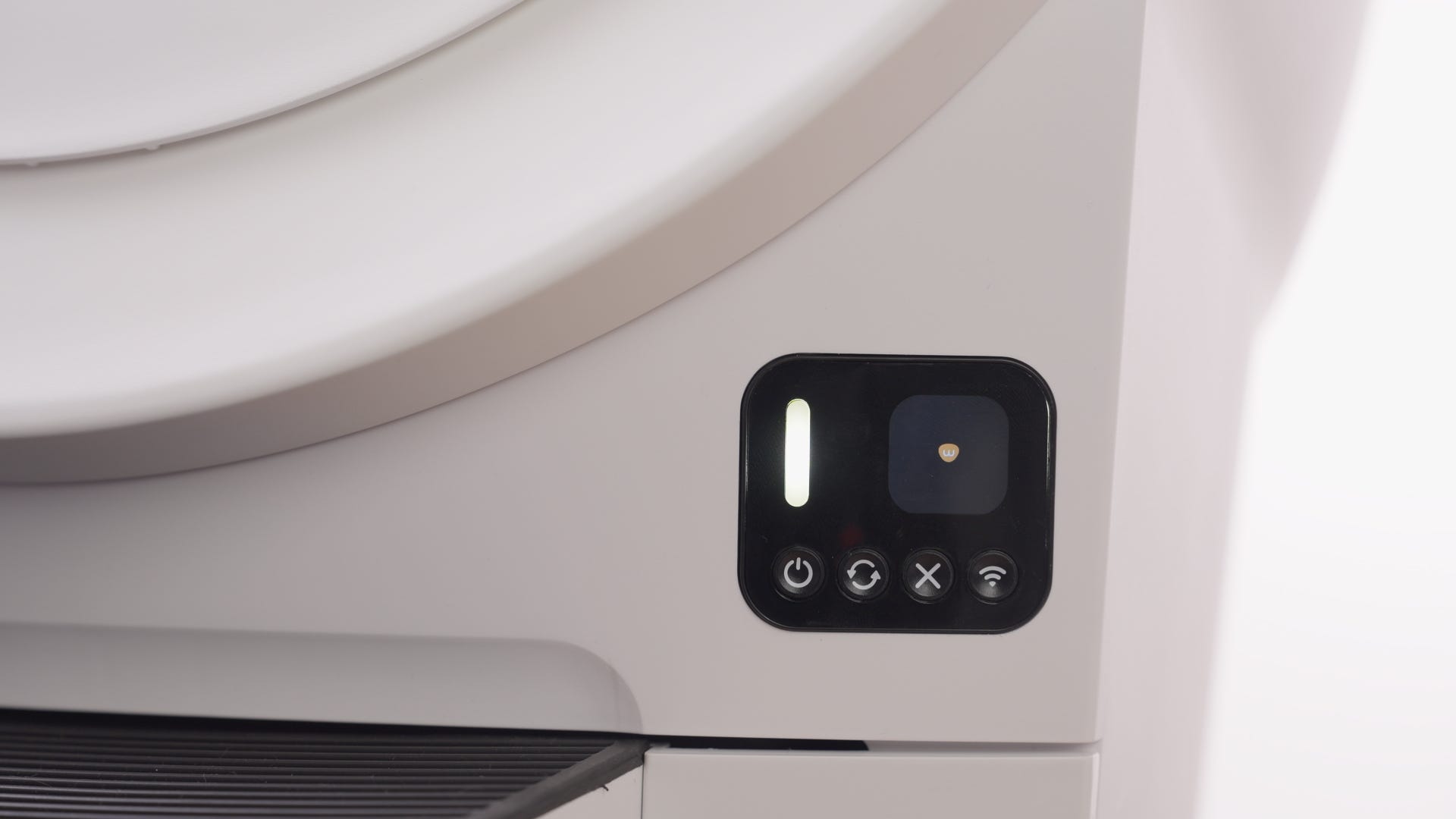
Litter-Robot EVO: Control panel buttons and functions
Control Panel

Power

Cycle

Cancel

Connect
LED indicator light
- Solid white: Online and ready
- Blinking blue: Setup mode (onboarding, language selection, etc.)
- Blinking green: Robot running (cycling, emptying, etc.)
- Blinking yellow: Attention required (waste drawer full, filter replace needed, etc.)
- Blinking red: Product fault (waste drawer full, waste drawer removed, etc.)
Power button functions
Power On/Off
Short press - Press the Power button to turn the unit power On or Off. When turning the unit On, the LED Indicator Light will be solid white.
Disable Control Panel Lockout
3-second long press - With the unit powered On, a 3-second long press of the Power button will disable Control Panel Lockout when it is activated in the Whisker app.
Cycle button functions
Clean Cycle
Short press - Short press the Cycle button to start a Clean Cycle.
Empty Cycle
3-second long press - A 3-second long press of the Cycle button will activate an Empty Cycle.
Cancel button functions
Cancel functionality
Short press - Press the Cancel button to cancel a paused Clean or Empty Cycle. Pressing the Cancel button in the Home position will also dismiss any resettable (yellow and some red) alerts on the display.
Zero the weight sensor
Short press - Press the Cancel button while the globe is at the Home position with the LED indicator light solid white to zero the weight sensors. Zero the weight sensors any time you affect the weight or placement of the unit (including emptying the waste drawer, adding or removing litter, or cleaning or moving the unit).
Filter Replacement Position
3-second long press - A 3-second long press of the Cancel button will activate a cycle that rotates the globe to the Replace Filter position. In this position, the Carbon Filter/OdorTrap® Holder at the bottom of the globe will face upward, making it easy to replace the carbon filter or OdorTrap packs. Follow the prompts on the LCD screen to confirm and activate the cycle.
Connect button functions
The Connect button is used as part of the WiFi onboarding process. Download the Whisker app, tap “Add a Device” within the Whisker app, and follow the prompts within the app to onboard and connect your Litter-Robot to your WiFi network.
If Litter-Robot loses WiFi connection, the LED indicator light will blink yellow. It will automatically attempt to reconnect to WiFi after an outage. The LED indicator light will change to solid white once Litter-Robot has reestablished connection.
Control Panel Lockout
Control Panel Lockout disables button functions to prevent unwanted changes. Litter-Robot functions normally in Automatic Mode, and the unit can be turned OFF by pressing and holding the Power button for 3 seconds.
With the unit powered On, a 3-second long press of the Power button will disable Control Panel Lockout Mode when it is activated in the Whisker app.
Hard Reset
A Hard Reset can be used to further troubleshoot Litter-Robot if an error is encountered and powering the unit On/Off does not resolve the issue. To perform a hard reset, power off the unit, unplug it from the base for 10 seconds, then plug it back in and power it on. You can also perform a Hard Reset by pressing and holding the Power button for 6 seconds.
Factory Reset
A Factory Reset can be used to restore Litter-Robot’s factory settings during troubleshooting or before transferring ownership of your robot. The latest firmware downloaded onto Litter-Robot will be maintained following a Factory Reset to ensure proper operation.
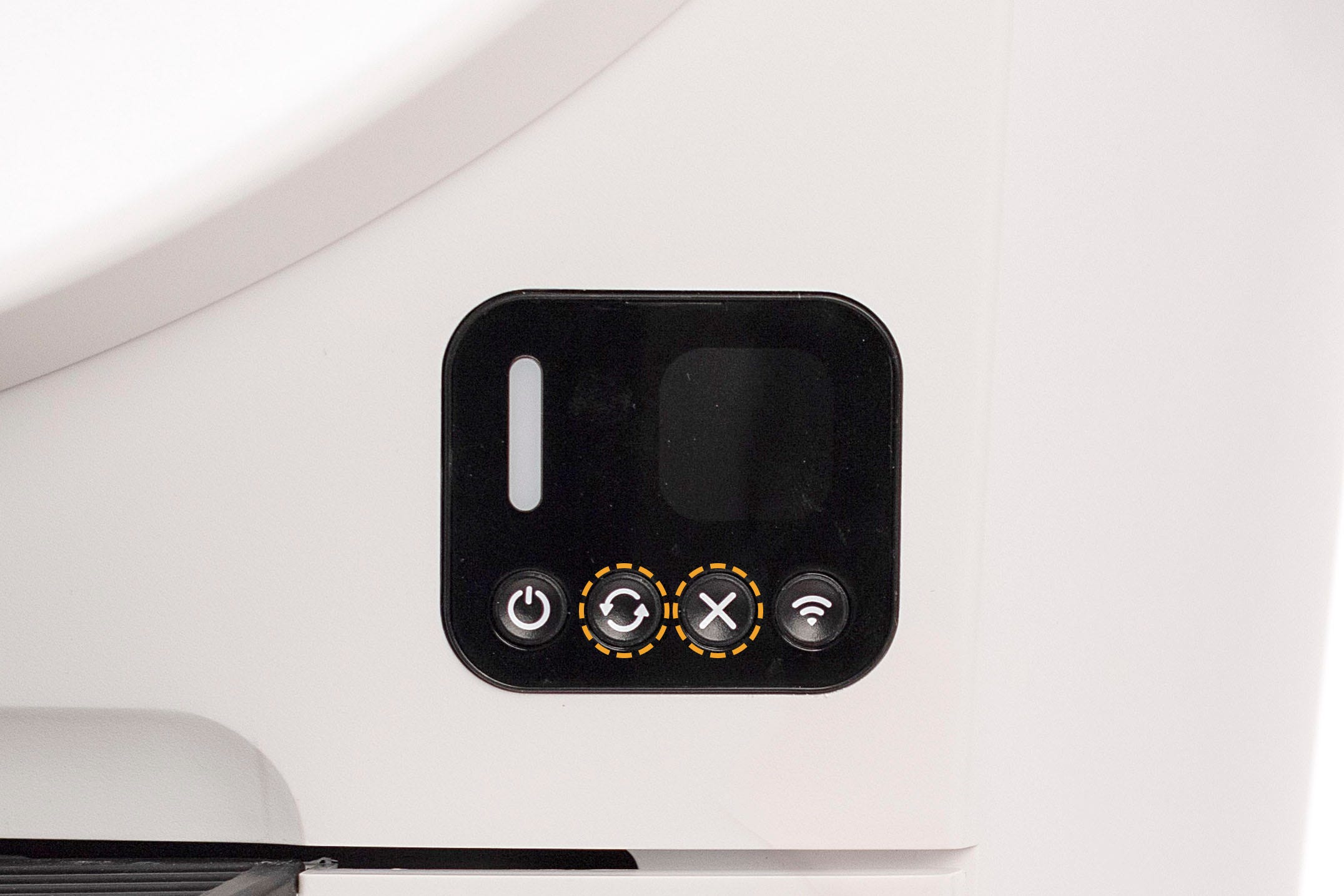
With the unit powered On, simultaneously press the Cycle and Cancel buttons for 3 seconds to conduct a Factory Reset of Litter-Robot. The LED indicator light will blink red and instructions will be provided on Litter-Robot’s LCD Screen to confirm and complete the process.
Need more help?
Please contact Whisker Customer Experience for further assistance.
Didn't find what you're looking for?
Live support available Mon-Fri: 9AM-9PM EST and Sat-Sun: 9AM-5PM EST, or submit a ticket anytime.