The store will not work correctly in the case when cookies are disabled.

Litter-Robot 3: Hard Reset
When your Litter-Robot 3 isn't functioning as expected, a hard reset can sometimes resolve persistent issues. This guide provides step-by-step instructions for performing a "fresh restart" when all other troubleshooting steps have been tried without success.
When to Perform a Fresh Restart
Before considering a Fresh Restart, ensure you have already attempted other troubleshooting methods, such as:
Verifying proper litter level and type.
Ensuring the waste drawer is properly seated.
If the issue persists, a fresh restart may be the solution.
How to Perform a Fresh Restart
Step 1: Power Down

Turn off the unit by pressing the Power button.
Unplug the power supply from the back of the Base.
Step 2: Disassemble the Bonnet and Globe

Remove the Bonnet by depressing the side tabs, tilting it backward, and lifting it off.
Remove the Globe and set it aside. (It’s okay to leave litter in the Globe, but be cautious if it’s not at the Home position to avoid spills.)
For more detailed instructions, visit our Litter-Robot 3 Assembly/Disassembly guide.
Step 3: Situate the Base

Ensure the Base is on firm, level flooring. Avoid placing it on carpeting or uneven surfaces. If necessary, place a flat board underneath.
Make sure the unit isn’t pushed against a wall or other objects.
Empty the Waste Drawer.
Step 4: Reassemble the Globe

Place the Globe back on the Base in the Home position, aligning it on the track.
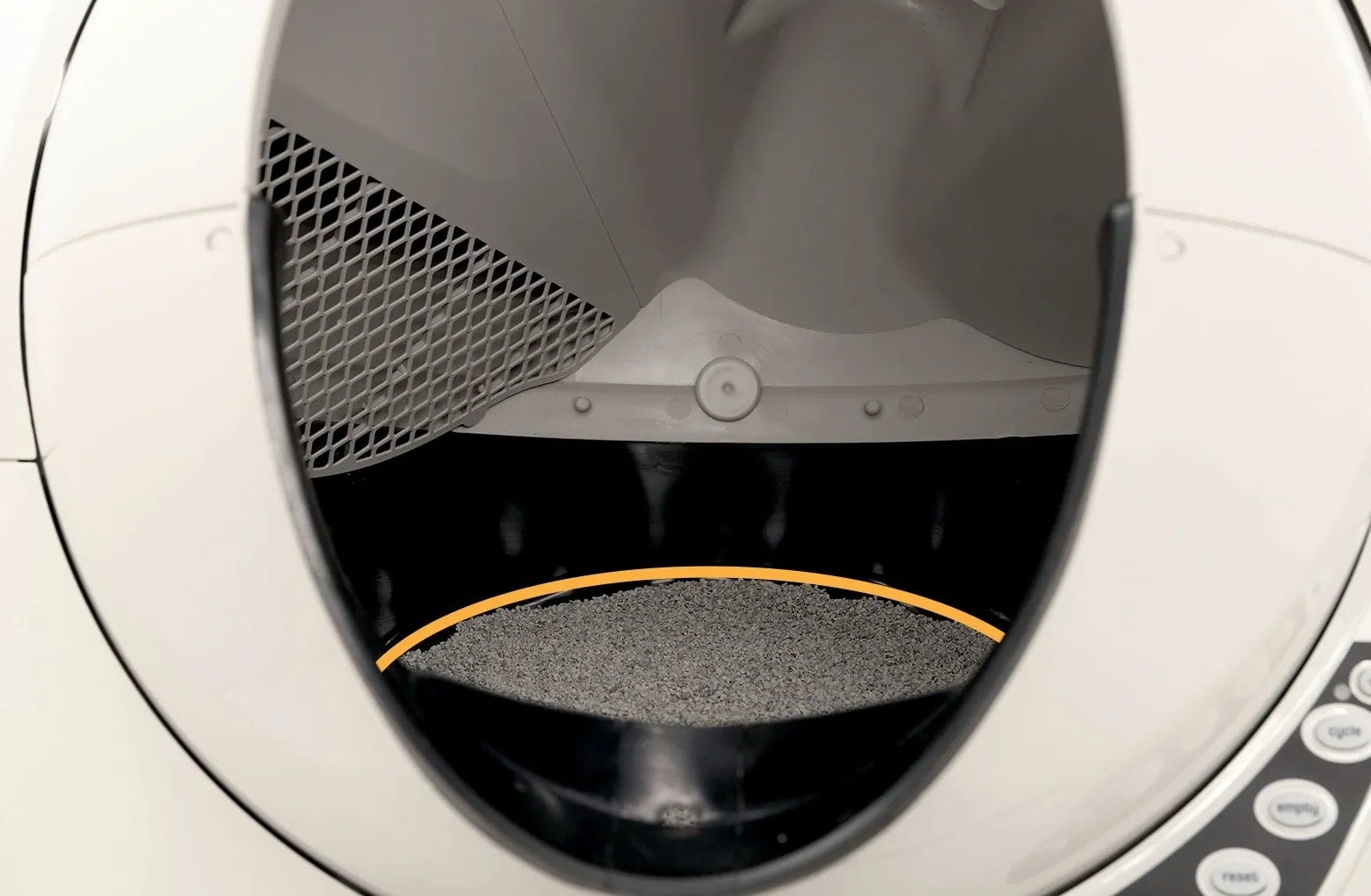
Check that the litter level is at or below the Fill Line on the black rubber liner.
Step 5: Reassemble the Bonnet

Attach the Bonnet by aligning the rear tabs with the Base, tilting it forward, and snapping the side tabs into place. Ensure all four tabs are securely fastened.
For more detailed instructions, visit our Litter-Robot 3 Assembly/Disassembly guide.
Step 6: Final Checks
Double-check that the unit is freestanding, not leaning on or touching anything.
Step 7: Power Up
Plug the power supply back into the Base.
Press the Power button to turn the unit on.
Step 8: Test cycle

Press the Cycle button to confirm the unit can complete a full Clean cycle.
The Globe will rotate counterclockwise to the Dump position and then return to Home, leveling the litter.
The blue light should be solid once the cycle completes.
Additional Notes
Avoid overfilling the globe with litter; it should not exceed the raised fill line.
Always use clumping litter as recommended in the user manual.
If you continue to experience issues after a hard reset, consult the Litter-Robot 3 Troubleshooter or contact Whisker Support for further assistance.
Performing a hard reset is a simple yet effective way to resolve many persistent problems with your Litter-Robot 3. By following these steps, you can ensure your unit operates smoothly and continues providing the convenience you expect.
For more detailed instructions, refer to the Litter-Robot 3 Instruction Manual, visit our Support Portal, or explore our YouTube channel.
Didn't find what you're looking for?
Phone and Chat support available Mon-Fri: 9AM-9PM EST and Sat-Sun: 9AM-5PM EST, or submit a ticket anytime.